
Overview
Onboarding new clients should feel welcoming and straightforward.
It is often the first real interaction someone has with your firm, and it sets the tone for everything that follows. In practice, this early stage is where unnecessary friction often appears. Yet for many firms, onboarding still involves a mix of emails, attachments, paper forms and follow-up calls. Information comes in slowly, details are missed, and teams spend valuable time chasing responses rather than moving matters forward.
Web Forms are designed to make this stage less stressful for everyone involved.
Instead of sending multiple documents or asking clients to complete forms manually, Web Forms guide people through the information you need in one clear, structured flow. Clients see one question at a time, written in plain language, and they can complete the form at a pace that suits them. This creates a more manageable first step, rather than an overwhelming list of requests.
For your team, the difference is immediate.
Information submitted through Web Forms feeds directly into the system, reducing the need for re-keying or manual checks. When clients enter their details themselves, accuracy improves and follow-up questions decrease. This allows fee earners and support staff to start work sooner, with greater confidence that the information they are working from is complete.
With Mozaique Web Forms, information collected from clients does not sit in isolation. Data can be checked for conflicts before being passed into the firm’s PCMS, helping to reduce duplication, improve accuracy, and remove friction at the very start of a matter.
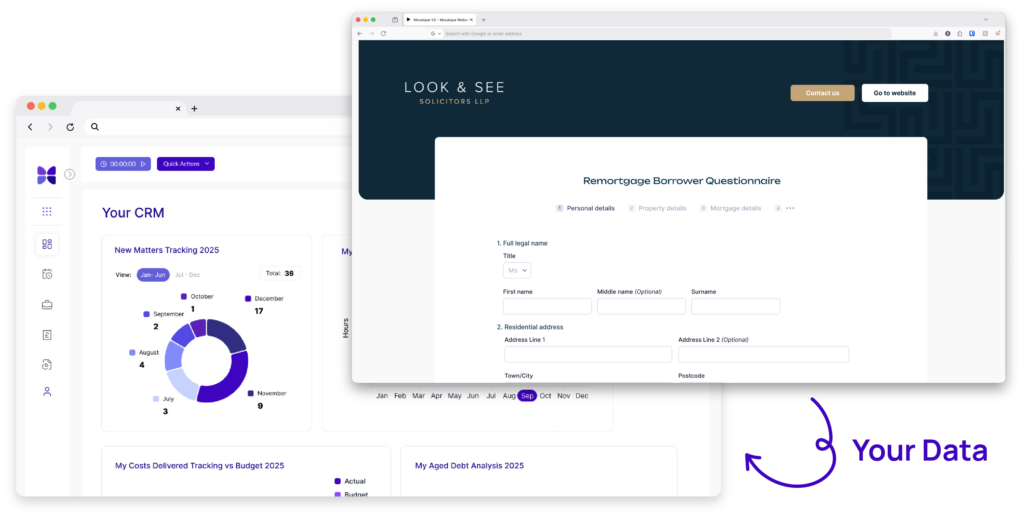
Web Forms also help create consistency across your onboarding process. Every client is guided through the same structured set of questions, which means nothing important is overlooked. This is particularly helpful during busy periods, when teams are handling multiple new matters at once. A consistent process reduces pressure and helps staff focus on progressing work rather than managing admin.
From the client’s point of view, Web Forms feel more modern and respectful of their time. Web Forms are designed to be mobile-friendly, enabling clients to complete onboarding on their own devices at a time that suits them, without pressure or confusion, and without needing to print documents or scan attachments. Clear prompts help them understand what information is required and why, reducing uncertainty and building trust early in the relationship.
Another benefit is visibility. When onboarding information is collected in a structured way, teams can see more quickly what has been completed and what is still outstanding. This makes it easier to follow up when needed and keeps matters moving forward without unnecessary delays.
Web Forms are not about adding another aspect of complexity to your systems, they are about removing friction from one of the most important stages of the client journey. By replacing fragmented processes with a single, guided experience, firms can create a smoother start for clients and a more efficient workflow for their teams.
A more straightforward onboarding process helps everyone feel extra confident. Clients feel supported rather than rushed. Staff spend less time managing paperwork and more time doing meaningful work. And the firm benefits from a process that is clearer, more consistent and easier to scale as demand grows.
FAQs
What are Web Forms used for during client onboarding?
Web Forms are used to collect key client information in a structured way at the start of a matter, helping firms gather accurate details without relying on emails or paper forms.
How do Web Forms make onboarding easier for clients?
They guide clients through questions one step at a time, using clear language, so the process feels manageable and less overwhelming.
Can clients complete Web Forms in their own time?
Yes. Clients can complete forms on their own device at a time that suits them, without needing to print or scan documents.
Do Web Forms reduce follow-up work for staff?
They do. When clients enter information directly, teams spend less time chasing missing details or correcting errors.
How do Web Forms improve accuracy?
Information is entered once by the client and fed directly into the system, reducing the risk of mistakes caused by re-keying data.
Are Web Forms suitable for all types of clients?
Yes. The guided format works well for clients who are unfamiliar with legal processes as well as those who are comfortable with digital tools.
Can Web Forms help standardise the onboarding process?
They ensure every client is asked the same core questions, which helps create consistency across matters and teams.
Do Web Forms help during busy periods?
Yes. A structured onboarding process makes it easier for teams to handle higher volumes of new matters without added pressure.
How do Web Forms affect the client experience?
They reduce early uncertainty by providing clients with a clear, predictable starting point rather than a series of disconnected requests.
Are Web Forms designed to replace existing systems?
No. They are designed to work alongside your existing systems, making onboarding simpler rather than more complex.
Are Web Forms designed to replace existing systems?
No. They are designed to work alongside your existing systems, making onboarding simpler rather than more complex.