Legal Aid Manager (LAM)
6 min read

Introducing the NEW Legal Aid Manager Civil Dashboard

Overview

Everything you need to know about your legal aid data, all in one place

Legal Aid fee earners manage a large amount of operational information on a daily basis. Matters need to be progressed, time needs to be recorded, certificates must be monitored, and costs need to remain visible throughout the life of a case. The challenge is not always a lack of information, but rather that the information sits in different places and is not easy to review at a glance.

The newly launched LAM Civil Dashboard is designed to address that problem by giving each user a personalised view of their workload, performance and financial position. The information shown is automatically limited to the matters and records associated with the signed-in user, helping fee earners focus on their own activity without having to filter through wider firm data.

A Clearer View of Current Legal Aid Work

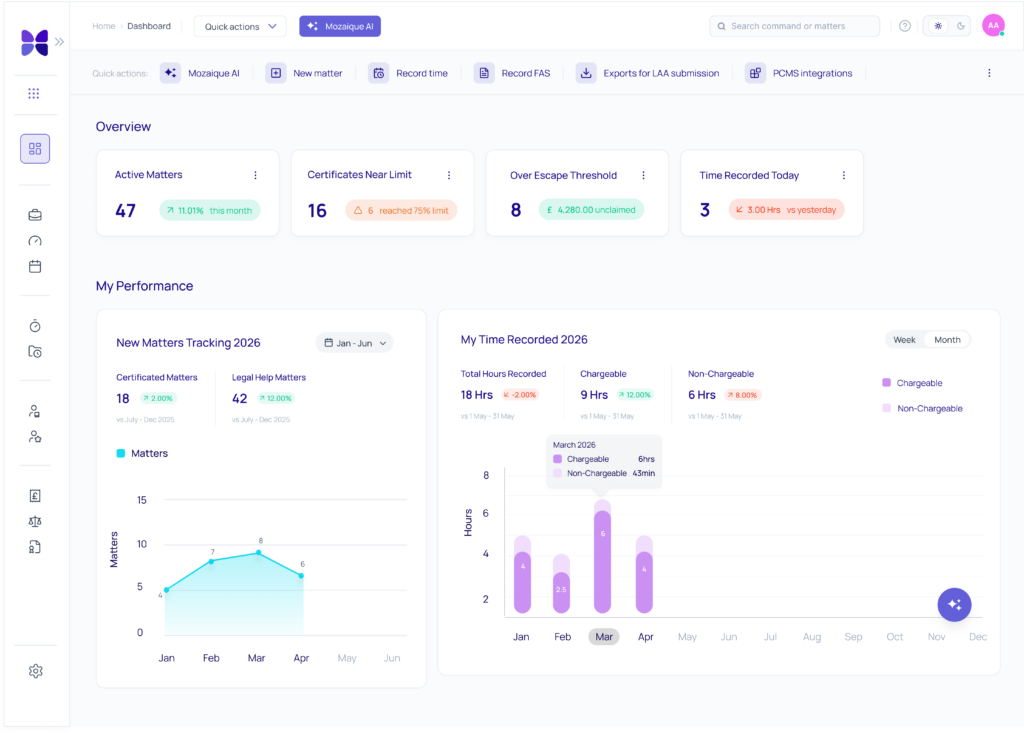
The Overview section brings together the figures that may require the most immediate attention. Fee earners can see their active matters, certificates approaching their cost limit, matters that have moved over the escape threshold, associated unclaimed costs, and the time recorded that day compared with the previous day.

This makes it easier to identify where action may be needed. A certificate nearing its limit can be reviewed before it becomes urgent. A matter above the escape threshold can be seen alongside the value that remains unclaimed. Time recording can also be checked during the day, rather than only being reviewed retrospectively.

Understanding Personal Performance

The My Performance section gives fee earners a clearer picture of how their work is developing over time.

New Certificated and Legal Help matters are displayed over a selectable date range, while time recording is divided into chargeable and non-chargeable activity. Users can switch between weekly and monthly views, depending on the level of detail they need.

Where previous-year information is available, percentage comparisons are shown for the equivalent period. This gives current performance more context and helps users understand whether matter openings or recorded time are increasing, decreasing or remaining broadly consistent. Rather than relying on isolated totals, fee earners can see patterns developing across their own work.
A Better View of Costs, Debt and Unbilled Work

The Cost Analysis section focuses on the financial side of a fee earner’s caseload.

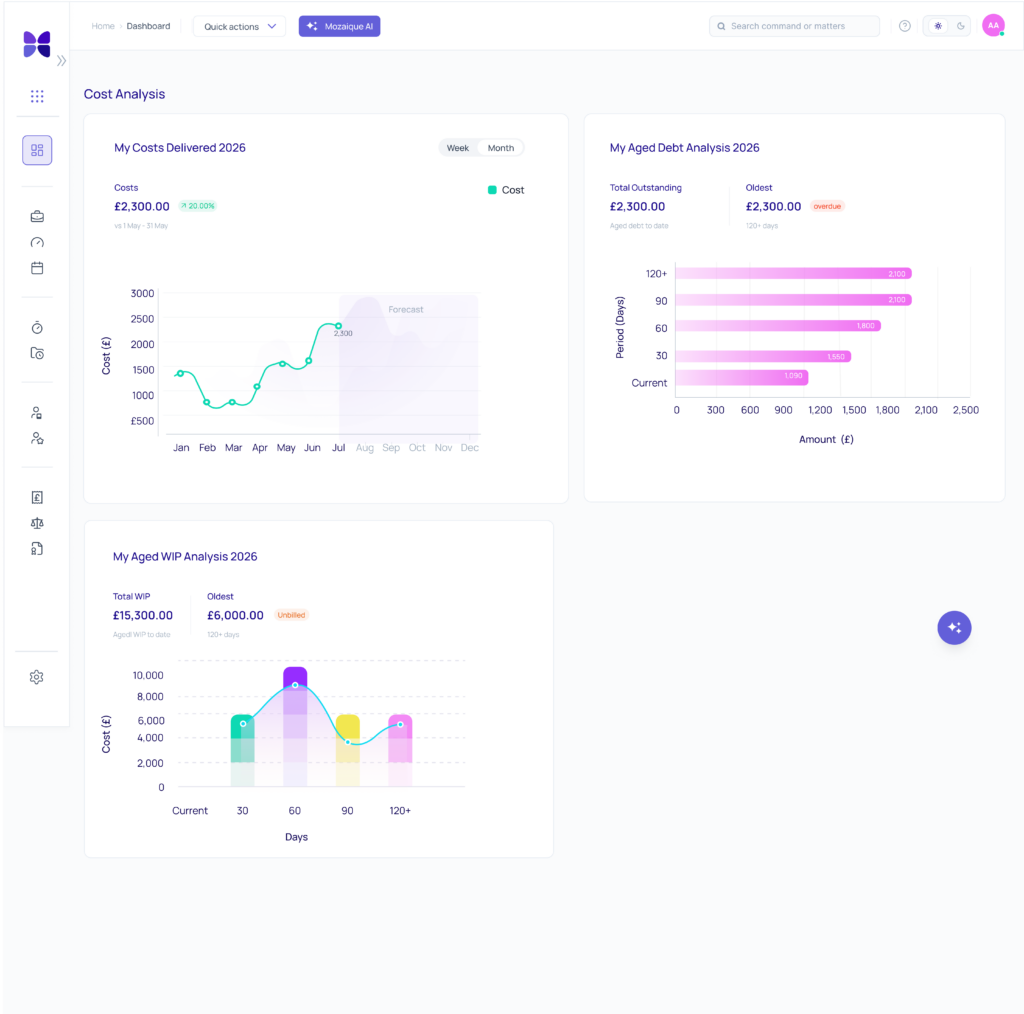
It shows costs delivered during the current year, including monthly actuals, comparisons with the same period in the previous year and forecasts for future months. Outstanding debt and unbilled work are also divided into Current, 30, 60, 90 and 120+ day age bands. This gives users a clearer view of work that has been delivered, amounts that remain outstanding and WIP that has not yet been billed. The age bands help make older items more visible, reducing the chance that debt or unbilled work remains hidden within a single total.
Designed to Be Practical

The dashboard charts include hover details, allowing users to view additional information without adding unnecessary clutter to the main screen. Each section also loads independently, so available information can be displayed without waiting for the whole dashboard to finish loading. These may seem like small details, but they support the dashboard’s broader purpose: making useful information easier to access during the working day.

The Civil Dashboard is the first step in a wider dashboard rollout within LAM. A Criminal Dashboard and Billing Dashboard are also on the way, giving firms further ways to view the information that matters across different areas of Legal Aid work. As these are introduced, the aim remains the same: to make important operational and financial information easier to understand, review, and act on.

A More Informed Starting Point

The LAM Civil Dashboard gives Legal Aid fee earners one place to review their workload, personal performance and financial position. By bringing together matter activity, time recording, cost information, aged debt and unbilled work, it helps users understand what is happening across their own caseload and where attention may be needed next.

To learn more about the newly launched LAM Civil Dashboard or to arrange a demonstration, contact the Mozaique team.

FAQs

Is the dashboard personalised?

Yes. It only displays matters and records associated with the signed-in user.

Can users compare current performance with previous periods?

Yes. Where previous-year data is available, equivalent-period comparisons are shown.

Does the dashboard show both chargeable and non-chargeable time?

Yes. Time recording is broken down into both categories, with weekly and monthly viewing options.

Does it include debt and WIP information?

Yes. Outstanding debt and unbilled work are grouped into Current, 30, 60, 90 and 120+ day age bands.


case studies

Hear from some of our clients who love Mozaique.

Legal Aid Manager (LAM)
8 min read

Introducing Outlook Time Recording for Legal Aid Manager

Overview

Moving to a Legal Aid Management System Without Losing the Workflow Your Team Relies On

Key reasons legal aid firms require an Outlook Add-On for Legal Aid software:

  • Even a thirty-second delay in capturing a completed task can silently erode a Legal Aid firm’s profitability and skew monthly reporting.
  • The success of a system migration often depends less on the technology itself and more on how well it fits the way fee earners already work.
  • Minor, retrospective time-recording errors can quietly disqualify a matter from critical Legal Aid funding thresholds.

  • Upgrading your firm’s core platform shouldn’t mean disrupting the daily workflows your team relies on to stay productive.

For Legal Aid firms, time recording sits at the heart of billing, reporting, and matter profitability. For firms evaluating a new legal aid management system, maintaining familiar workflows can be just as important as introducing new functionality. A successful transition depends on ensuring that the processes fee earners rely on every day continue to support accurate time recording and billing.

A significant amount of Legal Aid work takes place in Outlook. Emails are reviewed, drafted, filed, and actioned throughout the day. When recording that activity requires a second step in a separate system, duplication is introduced into the process. The consequences can be significant. Missed or delayed entries can affect billing accuracy, create additional review work, and impact reporting. In some cases, they can influence whether a matter reaches an escape fee threshold.

Even when time is eventually recorded, entering it retrospectively can create its own challenges. An email completed in one month but recorded in another may affect reporting accuracy, management information, and fee earner targets. For firms moving to LAM, the goal is not to change how people work, but to ensure valuable functionality is not lost during the transition to a Legal Aid-focused platform.

How the Legal Aid Manager Outlook Add-On Works Without Adding Complexity

The Mozaique Outlook Add-On is designed to reduce duplication while maintaining alignment with LAM. As part of a broader legal aid case management system, the add-on helps ensure that time recording remains closely connected to matter management, billing, and reporting activities. Rather than introducing another process, it allows users to record time within the environment they already use throughout the day.

A Simple Process

The workflow is intentionally straightforward.

  • Users search for a client using a name, code, or reference.
  • Once selected, all associated matters become available through a dropdown list.
  • The relevant matter is chosen, and the matter level is automatically selected when only one option exists.
  • The user enters the appropriate time units, adds a brief narrative describing the work undertaken, and records the entry.
  • Once submitted, the information is reflected within the underlying system.

By keeping the process short and familiar, the add-on reduces the effort required to capture activity in real time.

Legal aid cost monitor

Built-In Intelligence That Reduces Manual Input

Legal Aid Manager’s Outlook Add-On recognises the user through their Outlook login and associates the entry with the correct fee earner. It identifies whether the communication is incoming or outgoing correspondence and applies the appropriate activity type based on the existing configuration within LAM. This means users spend less time selecting options and more time focusing on the work itself, creating a smoother process with fewer opportunities for errors or omissions.

Designed Specifically for Legal Aid Workflows

Many firms moving to LAM already rely on Outlook-based time recording. Preserving that capability is often a key requirement when evaluating a Legal Aid solution.

For firms reviewing legal aid software, maintaining established workflows can play an important role in user adoption and long-term success. While some systems offer Outlook-based time recording, they may not support Legal Aid-specific requirements in the same way. The Outlook Add-On has been developed specifically to support Legal Aid workflows within the LAM environment, helping firms move to a new platform without sacrificing familiar ways of working.

Designed for Real-World Usage

Legal Aid work does not always fit neatly into rigid system processes, which is why flexibility remains important. Entries default to a single unit but can be adjusted where required. In some situations, emails can be treated as fixed items rather than time-based units, allowing activity to be recorded based on quantity rather than duration.

The add-on also supports practical working habits. Users may record a single activity immediately or capture several similar activities together where appropriate. This flexibility helps ensure that the system supports the way people actually work rather than forcing users to adapt to unnecessary complexity.

What Legal Aid Manager’s Outlook Add-On Changes in Practice

By reducing duplication and capturing activity as work is completed, firms can improve consistency without introducing additional administrative steps.

Recording time at the point of activity reduces the need to reconstruct work later or review files to identify missing entries. It also helps ensure that activity is recorded in the correct reporting period, supporting billing accuracy, management information, and fee earner performance reporting.

Perhaps most importantly, the add-on helps preserve the workflows that fee earners already use every day. Feedback from firms suggests that the ability to record time directly from Outlook is not simply a useful enhancement. For some, it’s a deciding factor when considering a move to LAM.

Conclusion: Preserving the Way Legal Aid Teams Work

Accurate time recording supports billing, reporting, and operational control. The challenge is ensuring it happens without adding unnecessary administration.

The Outlook Add-On helps Legal Aid firms record activity where much of their work already takes place: in Outlook. By removing duplication and preserving familiar workflows, firms can move to LAM without sacrificing the processes their teams rely on every day.

FAQs

Can time be recorded directly from Outlook?

Yes. The Outlook Add-On allows users to record time within Outlook and send entries directly into LAM without switching systems.

Why is Outlook-based time recording important for Legal Aid firms?

It allows fee earners to record activity while they are working, reducing duplication and helping ensure time is captured accurately.

Does the add-on automatically recognise the fee earner?

Yes. The system identifies the user through their Outlook login and associates the entry with the correct fee earner.

How does the add-on help reduce missed time?

By allowing users to record activity at the point it takes place, the add-on reduces the risk of work being forgotten and entered later.

Is this a feature built specifically for LAM?

Yes. The Outlook Add-On has been developed as a Mozaique feature supporting Legal Aid workflows within the LAM environment.

Does the add-on replace time recording in LAM?

No. It works alongside LAM, providing a convenient way to record activity from Outlook while keeping all information aligned with the core system.

case studies

Hear from some of our clients who love Mozaique.

Legal Aid Manager (LAM)
8 min read

Actionstep integrate with Accesspoint’s Mozaique Legal Aid Manager

Overview

Bringing Seamless Legal Aid Billing to Cloud-Based Practice Management

Accesspoint, the legal-sector technology specialist behind the Mozaique platform, announced that its Mozaique Legal Aid Manager now integrates directly with Actionstep, the cloud-based practice and case management system (PCMS) used by law firms worldwide. 

The integration connects Mozaique’s AI-powered Legal Aid matter management, billing and compliance engine with Actionstep’s all-in-one practice management platform. As a connected platform, it provides legal aid practitioners a joined-up workflow from matter opening through to Legal Aid Agency (LAA) submission. Matter and client data flows automatically between the two systems, removing duplicate data entry and the errors that come with it.

What is the Mozaique Legal Aid Manager?

Mozaique’s Legal Aid Manager is an AI-powered legal aid matter management, billing and compliance engine that eases the financial pressures unique to legal aid firms. LAM turns compliance-heavy admin into a streamlined workflow, enabling lawyers to get paid what the case is really worth. With implementation taking less than 30 minutes, firms can start benefiting from the platform almost immediately. 

Key Features

Automatic Contract Upload

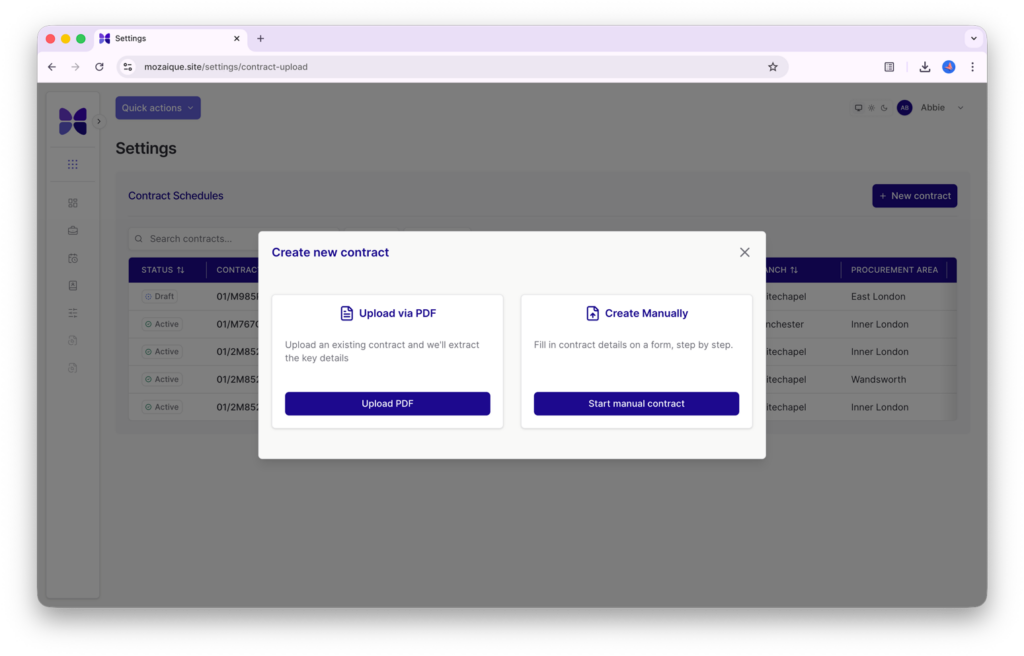
Contract setup is effortless: instead of the traditionally cumbersome data entry most legal aid systems demand, Legal Aid Manager’s automatic contract upload lets you drop in a PDF contract and Mozaique’s proprietary AI extracts the data for you, ready to create cases, record time and bill straight away.

Time Recording and Certificated Work

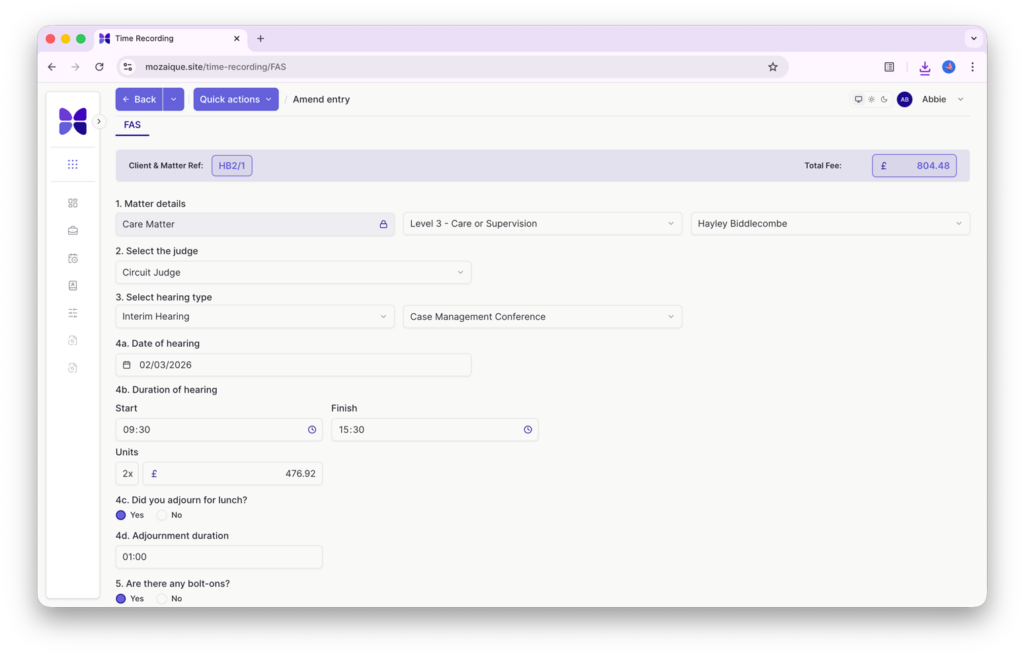
Legal Aid Manager also speeds up day-to-day time recording. Core and FAS time are captured with built-in, Mozaique-maintained rates, and smart time capture validates entries against current LAA rates in real time. For Family work, a dedicated FAS (Family Advocacy Scheme) screen manages hearings, bolt-ons and claim bundles in one place — capturing court level, judge, hearing type, dates, duration and attendance, with fees calculated automatically as you work — so advocacy income is captured correctly and claimed in full. 

Visual Cost Monitor

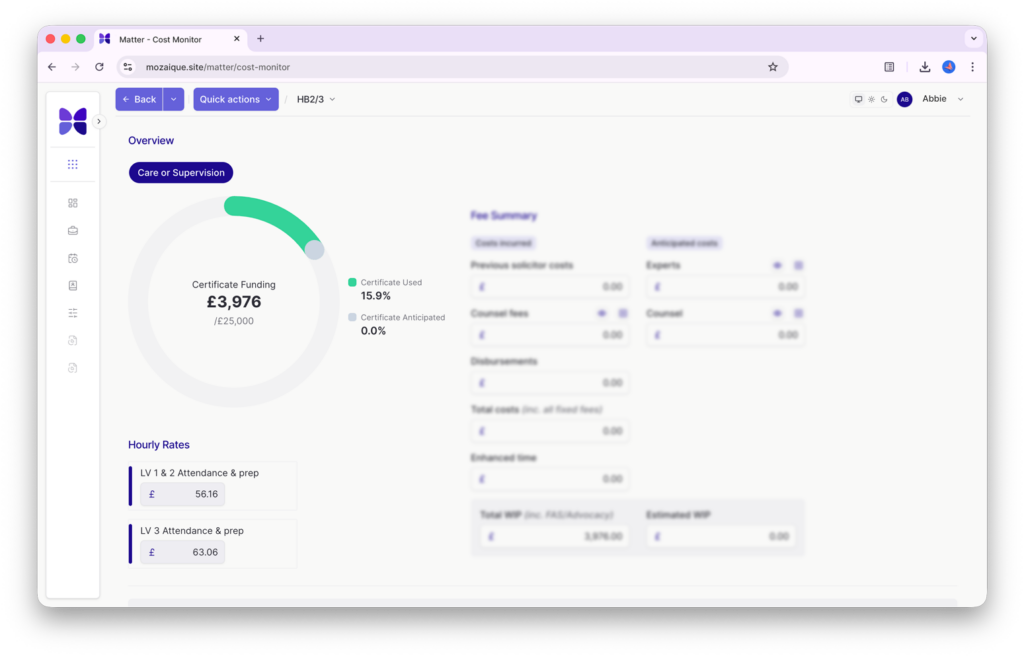
The Visual Cost Monitor gives an at-a-glance graph of funding status across fixed-fee and certificated cases, showing fixed fees, escape fees, time value, anticipated certificate costs and exactly how close a matter is to the escape threshold — replacing reactive, end-of-case cost-fixing with proactive control. 

Billing Tracker

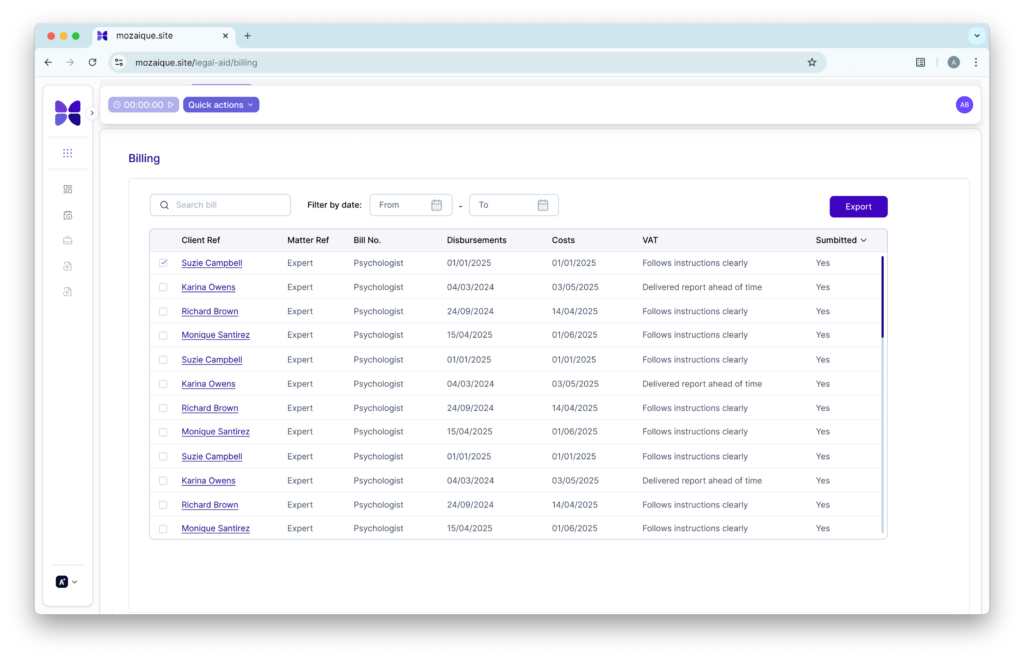
The Billing Tracker gives firms complete control over Legal Aid billing, from fixed fee legal help claims and escape cases through to interim payments and final CCMS claims. Built-in intelligence applies panel enhancements and highlights potential additional enhancements, helping maximise recoverable costs while maintaining compliance. 

Using the Mozaique Gateway, complete bills—including profit costs, fee-earner allocations, disbursements and VAT—flow directly into connected legal accounts systems and PCMS platforms such as Actionstep. Monthly submissions are generated and exported ready for upload to the LAA. 

AI Enhancement Assessor

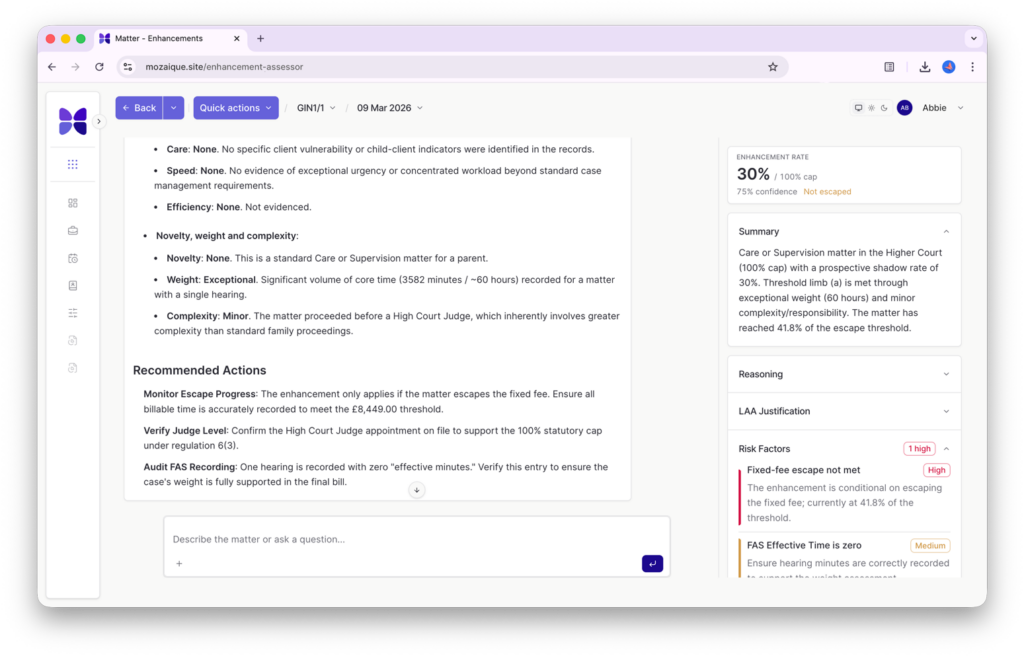
The AI Enhancement Assessor is a bespoke AI engine trained on official LAA Cost Assessment guidance. It scores each matter, returns a clear estimated enhancement percentage with links back to the relevant sections of the documentation for justifications, and recommends next steps to strengthen the claim and reduce rejections. Firms recover the full value of every case rather than simply billing time recorded. 

The result is specialist Legal Aid functionality that plugs the gaps in mainstream case management software, keeps firms compliant as LAA rates and rules evolve, and ultimately helps them get paid what their cases are really worth. 

What’s the latest news around Legal Aid Manager?

Coming Soon: Crime in Legal Aid Manager

The Accesspoint team got together in London for a Mozaique strategy meeting to finalise the launch for Crime in Legal Aid Manager. With Civil Legal Aid now complete, the development team has made strong progress on Crime which is due in early Autumn. Watch out for further updates and a series of webinars to support the launch. 

Blaser Mills Law are the latest to sign up to Legal Aid Manager, with another 8 firms onboarded in May

Throughout May, the Accesspoint team onboarded 8 law firms to Legal Aid Manager, with Blaser Mills Law being the latest to sign up. The award-winning, South East based law firm will now benefit from AI-powered certificate management, automated compliance workflows, and direct PCMS integration, making sure that time is captured and submitted accurately. 

Hear from Accesspoint’s Managing Director

“Having worked closely with Legal Aid firms for many years, we saw first-hand the growing financial and administrative pressures they face, alongside a lack of technology designed specifically for their needs. Mozaique was built exclusively for Legal Aid lawyers, reimagining how Legal Aid matters are managed by combining specialist workflows with AI-powered tools that help firms reduce overheads, maximise recoverable costs and focus more time on delivering legal services. By integrating with Actionstep, we’re letting firms layer our specialist Legal Aid capability on top of a fantastic cloud-based PCMS solution. It’s a game changer for legal aid firms nationwide.

Scott Brown, Managing Director at Accesspoint (creators of Mozaique)

To summarise: Actionstep become the first of many UK case management platforms to integrate with LAM

With the launch of LAM’s comprehensive open API toolkit, legal technology providers can now create deep and extensive integrations directly with the platform. Actionstep is the first of many UK case management platforms to adopt the toolkit, extending its capabilities into LAM and providing legal aid lawyers with a seamless end-to-end solution that connects legal aid administration with day-to-day case and practice management. 

About Mozaique: Mozaique is the integrated legal technology platform made by Accesspoint Legal, bringing together specialist modules including the Client Portal, Conveyancing Calculator and Legal Aid Manager. Since 2012, Accesspoint has worked side-by-side with law firms to build technology that fits the way legal professionals actually work: smarter, simpler and more human.

About Actionstep: Actionstep is a cloud-based legal practice and case management platform that combines CRM, matter management, document assembly, time and billing, trust and office accounting, and reporting in a single system accessible from any browser.

case studies

Hear from some of our clients who love Mozaique.

Legal Aid Manager (LAM)
4 min read

Changing the maths for Legal Aid lawyers with new Legal Aid Software

Overview

Why we built a new legal aid management software

For years, Legal Aid lawyers have been asked to do more with less: fewer resources, tighter margins, heavier caseloads. In 2024, 82% of practitioners surveyed by the Law Society reported that Legal Aid work was loss-making. The challenge was that the digital tools built for private-practice billing didn’t fit the complex, rule-bound world of Legal Aid.

We saw an entire sector working in fragments: spreadsheets here, portals there, disconnected systems everywhere. So we set ourselves a simple but audacious goal to make Legal Aid viable again through intelligent automation and guided design.

Legal Aid Manager (LAM) is a SaaS case management and billing platform designed to seamlessly integrate with other systems or use as a stand-alone application. It streamlines operations, automates compliance-heavy workflows, and ensures every billable activity is captured, validated, and submitted accurately.

Listening before building legal aid software

Accesspoint started to build Legal Aid Manager with research, not code. We interviewed lawyers, cost drafters, and Legal Aid Agency contacts. We hosted workshops with partners, ops leads, and IT teams to map every breakdown trigger from client onboarding to final billing. Those sessions revealed the heart of the problem: lawyers were short of time and tools that understood Legal Aid logic.

Our brief became clear: turn expertise into an experience, not just another administrative task.

UK Legal aid firms have tested Legal Aid Manager

Eight firms representing every type of PCMS helped test each sprint. Their feedback shaped the product as much as the code did. That partnership model is now a core Accesspoint principle: every build is a shared build.

Designing a guided journey in legal aid software

From our insights, Legal Aid Manager (LAM) was born: a standalone SaaS platform that helps firms manage budgeting, cost control, time capture, and compliance in one connected workflow.

LAM thinks alongside the lawyer, prompting the right actions at the right time. LAM front-loads prediction — anticipating enhancements, funding limits, and fee changes — so firms recover more of what they earn and reduce WIP lock-up.

Legal aid cost monitor

We built LAM with empathy and precision

Behind the interface lies months of structured R&D.

  • AI agents that learn from paid bills to suggest future enhancements.
  • Middleware that bridges legacy PCMS systems and modern cloud tools.
  • Conditional logic trees that model how real Legal Aid cases evolve day to day.
    Each feature originated from collaboration: engineers working closely with lawyers, reimagining what “cost management” could mean when it’s simple, visual, and intuitive.

We’re giving legal aid lawyers their time back

Legal Aid Manager is about restoring balance. By letting the software handle the complexity, lawyers can again focus on the reason they joined the profession in the first place: helping clients find justice.

case studies

Hear from some of our clients who love Mozaique.

Legal Aid Manager (LAM)
7 min read

Legal Aid Cost Monitoring Within Legal Aid Software

Overview

Cost Visibility, Built Into the Matter From the Start

In Legal Aid Manager, the Cost Monitor sits inside every matter from the moment it is opened, providing the kind of real‑time visibility that legal aid software should deliver as standard. It shows the certificate or fixed fee value, the amount recorded so far, and how much headroom remains. All in one place, without running reports or checking spreadsheets.

As time is recorded, the indicator shifts automatically. Fee earners see the movement immediately, and supervisors can recognise when a matter is approaching its limit without needing to interrogate the file. This is continuous visibility, embedded directly into the workflow.

Why Cost Monitoring Matters in Legal Aid Practice

Legal Aid firms work within fixed fees, certificate limits and detailed assessment risk. Financial outcomes depend as much on process as on legal work. When visibility is delayed, decisions are made without understanding their financial impact.

Traditional tracking, periodic reviews, manual calculations, and spreadsheet checks create a gap between the work being done and the funding that supports it. The Cost Monitor closes that gap by keeping the financial position visible at the point decisions are made. This is one of the core functions legal aid software must support if firms are to maintain financial control.

Silent Overruns: What They Look Like in Practice

A silent overrun is the gradual movement of recorded time beyond authorised limits, without anyone noticing. In Legal Aid Manager, the Cost Monitor shows this movement as it develops. The indicator shifts as time increases, and the remaining headroom adjusts in real time. If a matter approaches its limit, that change is visible immediately, not at the billing stage.

For fixed fee matters, the escape threshold is shown as a separate marker. The system tracks the gap continuously, so the point at which a case becomes eligible for hourly billing is visible well before it is reached.

Where Traditional Tracking Falls Short

While most systems record time effectively, few are designed to model Legal Aid funding structures that align with the practical realities of how firms work.

When cost monitoring relies on manual intervention, visibility becomes retrospective, a common issue in any legal aid case management system that separates financial data from the matter workflow. The Cost Monitor removes that dependency. It automatically aligns recorded time with certificate values, fixed fees, and escape thresholds, updating as the matter progresses. There is no need to calculate positions independently or maintain parallel tools. The system does the alignment for you.

How the Cost Monitor Works Inside the Matter

When a matter is opened in your legal aid management system, the Cost Monitor provides a comprehensive view of the financial landscape by consolidating the certificate or fixed fee value with the time recorded to date. It automatically calculates the percentage of the limit consumed and the remaining headroom, while simultaneously tracking the escape threshold for fixed fee matters.

As time is added, the indicator moves. When thresholds are approached, the shift is visible. Certificated matters appear in grey, making them instantly recognisable without opening the file. Because the Cost Monitor is part of the matter itself, the information is always current. There is no refresh button. No report to run. No manual reconciliation.

Seeing the Escape Gap Before It Closes

In fixed fee matters, the escape gap is one of the most important financial turning points. Missing it often means missing the opportunity for detailed assessment.

The Cost Monitor keeps the escape gap visible throughout the life of the matter. The system continuously aligns recorded time to the threshold, so the position is always clear. Fee earners can see when the matter is approaching the point where strategy may need to change.

More Than a Visual Indicator

The indicator serves as the visual surface for a complex underlying model. Behind the scenes, the system actively manages certificate values and fixed fee structures while simultaneously tracking escape thresholds and authorised limits against recorded time. This ensures the visual feedback is always grounded in the specific financial architecture of the matter.

Supporting Better Financial Decisions

When financial information is visible, it shapes decision-making. Fee earners can see when a matter is approaching its limit. Supervisors can recognise when an amendment should be considered. The Cost Monitor does not enforce decisions, but it provides the context required to make informed ones.

Reducing Recoupment Risk

Recoupments often occur when payments on an account exceed what is ultimately allowed; this is a risk that continuous visibility helps mitigate. By keeping recorded time and authorised funding in constant alignment, the Cost Monitor reduces the risk of avoidable discrepancies and leads to more accurate, reliable billing decisions.

Designed for Legal Aid Billing Structures

Generic time recording tools cannot model the layered funding rules that a legal aid management system must support. The Cost Monitor is built specifically for those structures, allowing financial visibility to sit alongside case management rather than outside it. This works in tandem with specialised tools, such as the enhancement assessor, to ensure every aspect of the billing process is optimised.

The reliability of cost monitoring improves significantly when contract information is structured correctly at setup. By adopting a better way to manage LAA contracts, firms ensure that their financial monitoring is built on a foundation of accurate, live data rather than static PDFs or manual entries.

Financial Control Is Part of the Workflow

In Legal Aid practice, financial control is essential to sustainability. The Cost Monitor brings that control into the core of the matter, ensuring that certificate limits, escape thresholds and recorded time remain aligned, making financial oversight part of everyday practice.

Interested?

Get started with Legal Aid Manager today. Early adopters receive 6 months of FREE Mozaique AI Credits.

What is legal aid cost monitoring software?

It is a specialised tool that tracks legal aid financials, like certificate limits, fixed fees, and escape thresholds, in real time. Unlike generic software, it’s built specifically to ensure firms don’t exceed authorised funding by mistake.

How can I prevent “silent overruns” in legal aid cases?

Use a live Cost Monitor that automatically tracks recorded time against authorised limits. This visibility lets supervisors spot cases nearing their limits early enough to apply for amendments or adjust strategy before the work becomes non-billable.

What is an escape fee threshold in legal aid billing?

The escape fee threshold is the point at which a fixed-fee matter qualifies for hourly billing. Advanced systems track this visually, showing exactly how close you are to “escaping” the fixed fee and moving to a more sustainable hourly rate.

Why is real-time financial visibility important for legal aid firms?

Legal aid margins are razor-thin. Real-time monitoring allows for proactive cash flow management and ensures every hour worked is actually compensable, rather than discovering a funding shortfall weeks after the work is done.

Can legal aid software automate certificate limit tracking?

Yes. It aligns recorded time directly with the certificate value stored in the system. As you log time, your remaining “headroom” updates automatically, removing the need for manual calculations or clunky spreadsheets.

How does cost monitoring reduce legal aid recoupment risk?

Recoupment happens when payments on account exceed final allowed costs. By keeping recorded time and authorised funding in constant alignment, you can make accurate billing decisions that prevent the LAA from clawing back funds later.

What should I look for in a legal aid case management system?

Prioritise a system that integrates financial data into the matter workflow. Look for features like automated contract uploads, visual cost indicators, and built-in support for both certificated and fixed-fee rules.

How do I manage certificate amendments more efficiently?

The trick is seeing them coming. Good software alerts you when a matter hits a specific threshold (like 80% of its limit), giving your team time to submit amendment requests to the LAA before work has to stop.

Does legal aid software support both fixed fee and hourly billing?

The best systems handle the “hybrid” nature of legal aid seamlessly. They track fixed fee progress while simultaneously monitoring the escape threshold, giving you a clear view of when a case transitions to hourly rates.

How can law firms improve cash flow with cost monitoring?

By eliminating unbilled WIP and unauthorised overruns. Staying within limits and hitting escape thresholds intentionally ensures you bill the maximum amount possible without the delays caused by retrospective fixes.

case studies

Hear from some of our clients who love Mozaique.

Legal Aid Manager (LAM)
5 min read

A Better Way to Manage LAA Contracts with a Legal Aid Management System

Overview

Your Legal Aid contract defines your capacity and determines how many new cases your firm can take on. In practice, it shapes how you plan, how you allocate work and how confidently you make decisions throughout the year. And yet, in many firms, turning that contract into usable data still relies on manual entry.

For firms using a legal aid management system, the challenge is turning information into something structured, accurate and immediately usable.

So, imagine if you could automatically upload your legal aid contract? Our Legal Aid Manager can.

Keying in all the information from the LAA is a cumbersome process. We’ve resolved this through one quick import: a simple, automatic, AI-powered upload. You can also still edit before uploading (if need be).

When an LAA contract arrives, it usually comes as a structured PDF. The information is clear, but it still needs to be translated into something your system can use. That means extracting contract references, identifying categories of law, and entering matter start allocations field by field. Once entered, the data is checked, and often checked again.

The work itself isn’t difficult, but it’s repetitive and time consuming for legal aid lawyers. Over time, that repetition absorbs hours that could be spent on fee-earning work. At the same time, each manual input introduces the risk that something is recorded incorrectly. On their own, these pressures are manageable, but left to grow over time they build into something that affects how the firm runs.

What does manual Legal Aid contract entry actually cause?

What it looks like day-to-dayWhat it actually causes
Re-keying contract dataNon-recoverable admin time
Double-checking allocationsOperational drag
Using spreadsheets to track matter startsFragmented visibility
Reconciling discrepanciesData mistrust
Manual updates after amendmentsGradual data drift

A different starting point for Legal Aid Software

Our Legal Aid Manager automatic contract upload allows the firm to upload the LAA contract directly. From there, the process moves immediately into extraction. Within a legal aid case management system, this removes the need to treat contract setup as a separate administrative task, embedding it directly into the operational workflow. The system analyses the document and extracts key information, including contract references, legal categories, and matter data.

This information is then presented clearly for review before being confirmed and activated. The contract moves from static document to usable operational data within minutes.

This reflects a broader shift in how legal aid software is expected to operate, in which structured data is generated automatically rather than manually assembled.

What actually happens after you upload the LAA contract?

Once the LAA contract is uploaded, the system works through it. Once confirmed, that data is immediately available across the system, ready to support case creation, time recording, and billing without any additional setup. This is where legal workflow automation becomes practical rather than theoretical, with the contract moving directly into the system as structured, usable data.

You can still review contract data, just without the admin burden

Importantly, this does not remove oversight. Once the contract has been processed, the extracted data is presented for confirmation. Everything can be reviewed and adjusted where necessary, before anything becomes active within the system.

The responsibility remains with the firm; what changes is the amount of manual work required to get there. Within a legal aid case management system, this ensures that contract data is not only accurate but immediately usable across the wider workflow.

What does this change in practice?

When contract data is structured correctly from the outset, the effect is immediate. What was once a static PDF becomes something more useful: a live, structured representation of your contract that stays aligned with how your firm actually works. Once that contract data is structured correctly, firms gain a clearer foundation for managing financial exposure. This is where tools such as the Legal Aid Cost Monitor become critical, helping track how certificate limits are consumed in real time and ensuring that structured contract data translates into controlled billing decisions.

FAQs

What is manual LAA contract entry?

It is the process of entering allocation data from a Legal Aid Agency contract into a system rather than having it imported automatically.

Why do firms still enter contracts manually?

Many digital systems were not designed around Legal Aid contract structures, so manual entry became standard practice.

Does manual entry create compliance issues?

Not directly, but errors can lead to discrepancies that need to be corrected later.

What does an LAA contract upload tool do?

It extracts key allocation data from the contract and structures it within the system for review and activation.

Is the contract activated automatically?

No. The firm reviews and approves all extracted data before activation.

Can amended contracts be uploaded in the same way?

Yes. Updated contracts can be processed using the same structured workflow.

case studies

Hear from some of our clients who love Mozaique.

Legal Aid Manager (LAM)
3 min read

The Enhancement Assessor Your Legal Aid Firm Needs

Overview

What is the Enhancement Assessor?

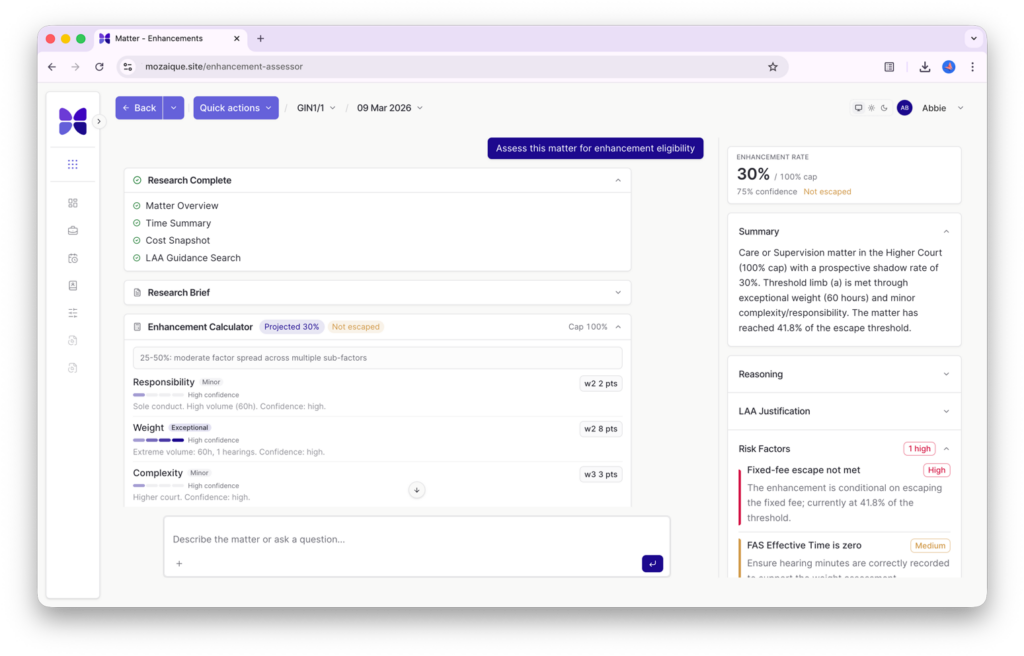
Within Legal Aid Manager, our AI-driven enhancement assessor finds lost revenue and increases billing, using the latest AI technology to establish the best costs assessment for your matter. Our bespoke AI system is trained on the official LAA Cost Assessment guidance, so that once details about your case are provided, it will provide you with enhancement uplift guidance to increase the time recording fee.

Even for experienced Legal Aid professionals, enhancement decisions are a regular source of uncertainty. This is why Accesspoint designed a tool to specifically support decision-making and demanding work in a challenging system.

Keep scrolling for features…

Enhancement Assessor Features

Choose from Preset Tasks

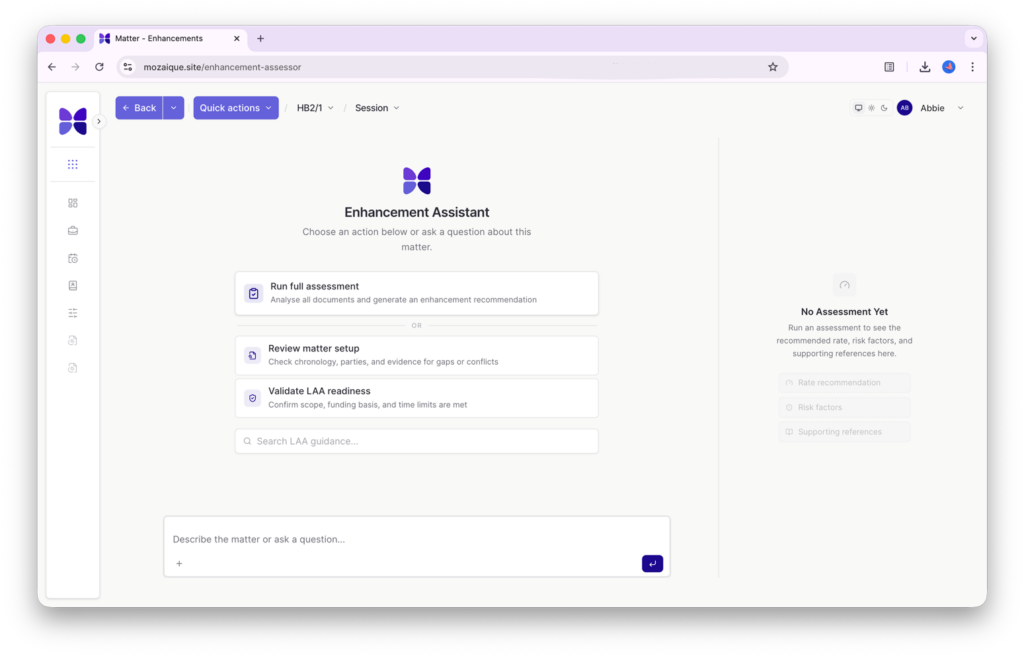
Upon opening the Enhancement Assessor within Legal Aid Manager, you can choose from three preset tasks or type in your own questions.

Enhancement Prediction

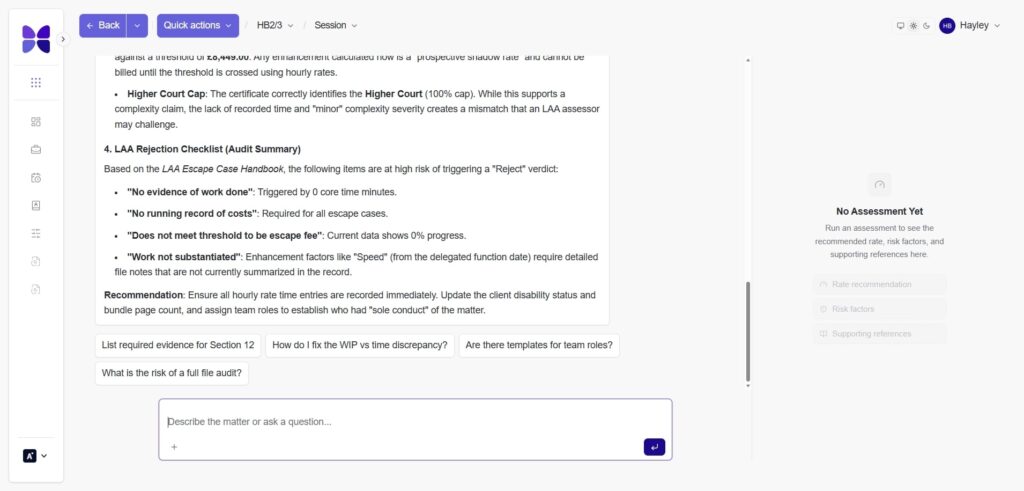
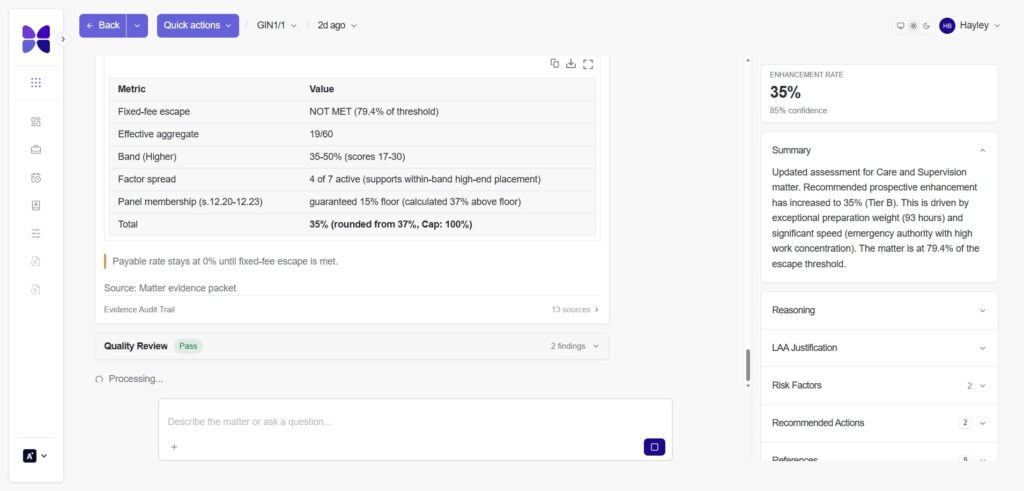
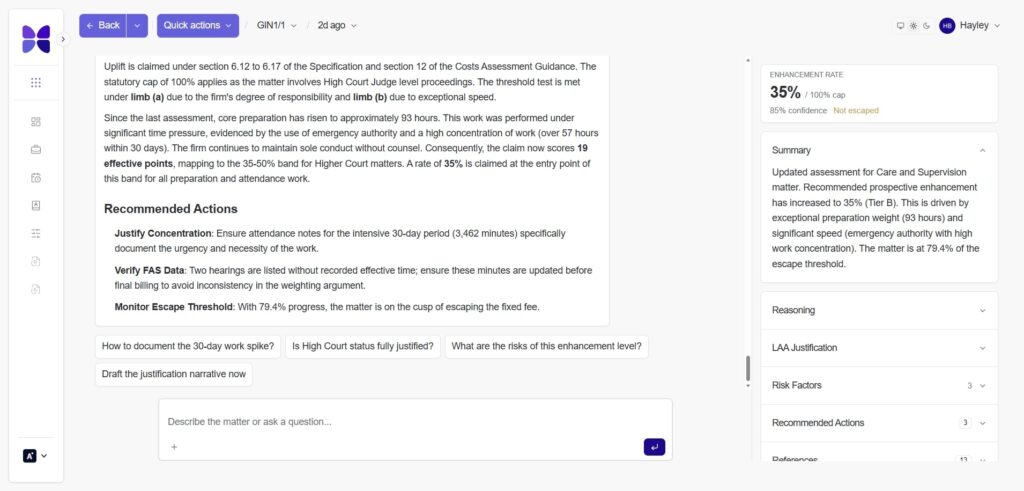
The AI Assessment Assistant provides a clear, estimated enhancement percentage, along with a plain-English summary of the outcome. It explains the reasoning behind the estimate, references the relevant LAA justification, highlights any compliance considerations, and recommends next actions to strengthen the matter and reduce risk.

Automatic Matter Association

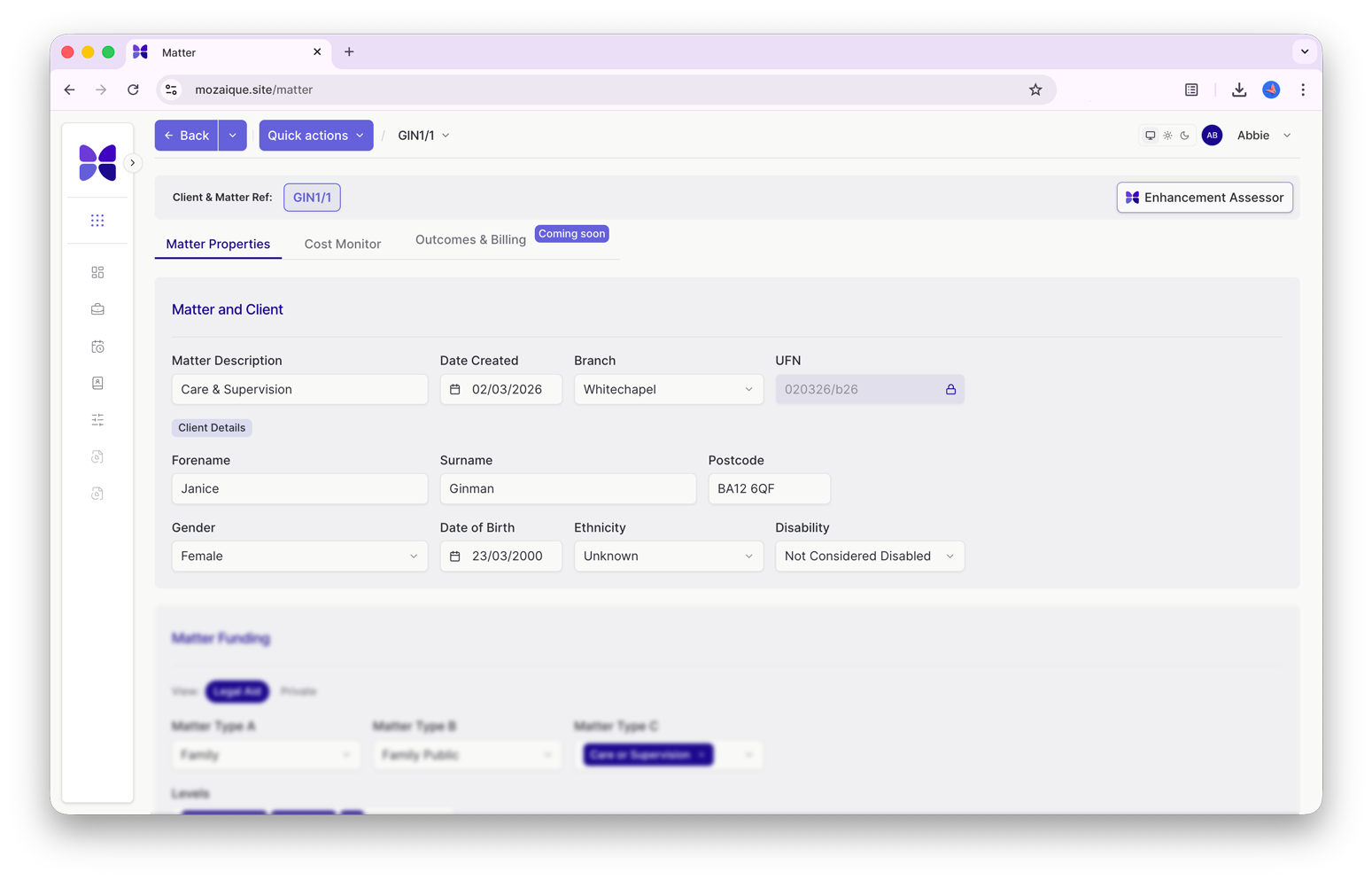
When you visit the AI Enhancement Assessor directly from a matter, it is automatically associated with the active matter. After the matter is reviewed and guidance provided, you will be given further information on matter readiness and recommendations.

Readily Available Matter Data

So much data is available within this feature, without even opening the matter. You can run a full assessment, review matter set up, validate LAA readiness, confirm whether the case has escaped, and explain and provide thresholds. You can also access time recording and LAA guidance.

Detailed Reasoning

Expand and review a detailed reasoning behind the assessment provided.

Recommended Actions

After the assessment is finished, it will output recommendations. You then have the opportunity to ask further questions. For example, around panel membership or if the urgency increased.

Summary

The Mozaique Enhancement Assessor is here to help you think clearly, document your reasoning, and move forward with greater confidence. In a system where certainty is rare, that support can make a meaningful difference.

Enhancement Assessor Overview

Our Enhancement uses the latest AI technology to establish the best costs assessment for your matter. Our bespoke AI system is trained on the offical LAA Cost Assessment guidance, so that once details about your case are provided, it will provide you with enhancement uplift guidance to increase the time recording fee.

Enhancement Assessor Options

Our AI Assistant gives you flexible validation options:

    • Run a full assessment to check a matter against all relevant Legal Aid Agency rules, analyse documents and generate an enhancement recommendation.

    • Review matter setup to identify configuration issues early, check chronology, parties and evidence for inconsistencies.

    • Validate work against current LAA guidance before submission — confirm scope, funding basis and time limits, reducing rejections and rework.

Interested?

Get started with Legal Aid Manager today. Early adopters receive 6 months of FREE Mozaique AI Credits.

case studies

Hear from some of our clients who love Mozaique.

Legal Aid Manager (LAM)
4 min read

From Code to Courtroom Confidence

Overview

A modern engine built for Legal Aid work

The Legal Aid Manager (LAM) rethinks how Legal Aid cost management should work in a modern practice. Behind its clean, guided interface lies a cloud-native technology stack chosen to solve problems that legacy systems were never built to handle: real-time budgeting, complex fee structures, rule changes, and integrations across wildly different PCMS platforms.

The stack that makes Legal Aid Manager possible

We built LAM using the same technologies that power today’s most reliable and scalable platforms, but tailored them for the realities of Legal Aid. Every choice we made solved a barrier that we identified during R&D:

  • Supabase & PostgreSQL for real-time data, secure authentication, and fast development without the fragility of old on-prem SQL setups.
  • Next.js on Vercel for speed, seamless deployments, and future-proof user experiences.
  • Temporal Workflows to automate long-running legal tasks like reminders, certificate checks, and cost reviews, reliably, visibly, and without human chase-up.
  • PostHog & DataDog for deep product analytics and observability, giving us clarity on user behaviour, system performance, and friction points.
  • OpenAI for intelligent suggestions, contextual summaries, and enhancement guidance, pushing Legal Aid automation into entirely new territory.
  • GitHub, Postman, and Bitwarden to safeguard the development pipeline, test integrations properly, and keep credentials secure.

Legal Aid Manager (LAM) is a SaaS case management and billing platform designed to seamlessly integrate with other systems or use as a stand-alone application. It streamlines operations, automates compliance-heavy workflows, and ensures every billable activity is captured, validated, and submitted accurately.

Solving the integration puzzle with dynamic middleware

Legacy PCMS systems each come with their own schema, constraints and access limitations. Early in development, we hit a wall: there was no feasible way to get consistent data into LAM’s front end using direct API calls alone.

So we built a different approach:

  • A dynamic middleware layer that ingests inconsistent PCMS data.
  • Normalises and reformats it into a unified structure.
  • Feeds LAM a consistent, predictable dataset, regardless of the source system.

For modern systems like Actionstep, we’re extending this with service-account-level API access, giving the breadth and depth needed for complete Legal Aid workflows. This middleware is now one of LAM’s quiet superpowers, an invisible layer that makes everything else work smoothly.

Why does this matter for law firms?

Private-practice-oriented systems were never designed for Legal Aid’s fee structures, variable cost limits, or complex rules.
LAM’s modern architecture finally delivers what lawyers have been missing:

  • Real-time cost monitoring instead of after-the-fact spreadsheets
  • Faster, more accurate billing with fewer rejections
  • Better WIP visibility and reduced lock-up
  • A clear, structured journey that reduces errors before they happen
  • A foundation built for continuous evolution as LAA rules change

When you pair a modern engine with deep Legal Aid expertise, something powerful happens: lawyers gain control, clarity, and confidence in every matter, not just at billing.

case studies

Hear from some of our clients who love Mozaique.

Legal Aid Manager (LAM)
6 min read

What Is The Mozaique Legal Aid Manager?

Overview

What is Legal Aid Manager?

Legal Aid Manager (LAM) is a SaaS case management and billing platform designed to seamlessly integrate with other systems or use as a stand-alone application. It streamlines operations, automates compliance-heavy workflows, and ensures every billable activity is captured, validated, and submitted accurately.

Legal Aid work comes with a unique set of pressures. The rules are strict, the margins are tight, and the consequences of getting something wrong often appear much later, when it is hardest to fix. Many firms only discover problems at the point of billing, long after the decisions that caused them were made. Mozaique’s Legal Aid Manager exists to help address that reality.

Legal Aid Manager removes profit-making barriers

Key features include: 
• Visual cost monitor
• AI Enhancement Assessment
• Automatic legal aid contract upload
• Seamless case management
• Billing tracker
• Time recording
• FAS (Family Advocacy Scheme)

By rethinking matter setup, time recording, funding management, and collaboration, we’ve built a legal aid system that removes profit-making barriers. At its heart, Legal Aid Manager is designed to support firms working within Legal Aid rules from the very beginning of a matter. Instead of treating eligibility, limits and compliance as checks to deal with at the end, it is built around the idea that these constraints shape the work throughout the case.

Many systems aren’t designed for Legal Aid

Legal Aid is often described as private practice with lower fees, but that comparison misses the point. Legal Aid operates under a different structure altogether. Eligibility rules, cost limits and scope restrictions influence decisions from the outset. They affect whether work can be undertaken, how far it can progress, and where risk begins to appear.

Legal Aid Manager is built for Legal Aid firms

Many practice systems were not designed with this in mind. As a result, firms often rely on experience, memory and manual checks to stay compliant. Knowledge sits with individuals rather than being supported by the system itself. When something is missed, it’s rarely obvious straight away. The impact is often felt much later, when options are limited. This creates ongoing uncertainty for fee earners and managers alike.

A snippet of how our Legal Aid Manager looks

Mozaique’s Legal Aid Manager is built with Legal Aid as a first-class practice area, not as an add-on to private practice workflows. Its purpose is not to automate legal judgment or promise guaranteed outcomes. Instead, it is designed to help firms see the boundaries they are working within earlier, so decisions can be made with clearer information and less stress.

When limits and requirements are clearer during the life of a matter, firms are less likely to face unexpected issues at the billing stage. Conversations about progress and viability happen sooner, rather than too late.

LAM supports your Legal Aid expertise

Legal Aid work often depends on a small number of experienced people who understand the system inside out. That expertise is invaluable, but it can also create pressure. When knowledge lives with individuals rather than being supported by systems, risk increases if workloads rise or staff change.

Legal Aid Manager is designed to support that expertise, not replace it. By embedding Legal Aid logic into the way matters are handled, it helps distribute understanding more evenly across teams. Fee earners gain confidence, managers gain earlier visibility, and firms rely less on last-minute fixes.

LAM is not a bolt-on or a shortcut. It doesn’t remove the need for professional judgement, and it doesn’t guarantee payment outcomes. Legal Aid will always involve uncertainty. The aim of Legal Aid Manager is not to eliminate that uncertainty, but to reduce avoidable surprises by making constraints clearer earlier in the process.

LAM puts Legal Aid first

Building a Legal Aid-first system reflects a deliberate choice. It recognises that Legal Aid is a core practice area with its own demands and pressures. By designing systems around those realities, rather than adapting generic tools after the fact, firms can work with greater confidence and less reactive stress.

Mozaique Legal Aid Manager exists because Legal Aid work deserves systems that reflect how it actually operates. By bringing visibility to rules and limits earlier in a matter, it helps firms make better-informed decisions, reduce late-stage disruption, and support the people doing demanding work every day.

FAQs

What is Legal Aid Manager?

It is a system designed specifically to support law firms undertaking Legal Aid work, built around Legal Aid rules and constraints rather than private practice assumptions.

Why does Legal Aid need its own manager?

Because Legal Aid rules and limits influence decisions throughout a case, not just at the billing stage.

Does Legal Aid Manager replace legal judgment?

No. It is designed to support lawyers by clarifying constraints, not to replace professional decision-making.

Is this a bolt-on to an existing system?

No. Legal Aid Manager is designed with Legal Aid as a first-class practice area, not as an add-on.

Will it guarantee Legal Aid claims are paid?

No system can guarantee outcomes. The aim is to reduce uncertainty and late surprises, not to promise results.

How does this help fee earners day to day?

By providing clearer visibility of limits and requirements earlier, fee earners can work with greater confidence.

Does it reduce reliance on specialist billing knowledge?

It supports broader understanding across teams, while still valuing specialist expertise.

Is this suitable for firms doing mixed work?

Yes. It is designed for firms where Legal Aid is a core part of their practice.

Will this add more administration?

The intention is to reduce late-stage correction and manual checking, not to add extra admin.

What is the main benefit of a Legal Aid-first approach?

Greater clarity earlier in a matter, supporting better decisions and fewer avoidable disruptions later on.

case studies

Hear from some of our clients who love Mozaique.

Get in touch

This field is for validation purposes and should be left unchanged.

Sign up to Legal Aid Manager

Fill in the form and a member of our team will be in touch to get you set up

This field is for validation purposes and should be left unchanged.